


.svg)

Introduction
If one of your tracking domains hits a blocklist overnight, Traffic Health alerts you before your conversions (and revenue) take a hit. It keeps an eye on the domains your campaigns depend on, watching for downtime, blacklist flags, and other issues that quietly cost you revenue. It comes in two packages: Basic, which is free and gives every account baseline uptime monitoring, and Premium, a paid add-on that unlocks full monitoring, reputation tracking, external notifications, and the complete Traffic Health interface.
This article walks through what each package includes, how Premium is priced by the number of domains you cover, and how to upgrade, manage your coverage, and change your plan, all from inside Everflow. Everything here lives under
Basic vs Premium
Every Everflow account starts on Basic at no cost. Basic gives you a baseline level of monitoring, while Premium expands coverage to every type of domain and turns on the parts of Traffic Health built for proactively protecting your traffic.
What Basic includes
Basic focuses on uptime: making sure the Everflow tracking domains your account already relies on are up and reachable. It also lets you view your domains, Dedicated IPs, and SSL certificates, and see how each domain performs. With Basic, you get:
Basic has no domain limit: every domain on your account gets this baseline uptime coverage automatically.
What Premium adds
Premium turns Traffic Health into a full monitoring and protection layer. You choose how many domains your plan covers, then decide which of your domains get that full Premium coverage (uptime and reputation monitoring) across every domain type, including domains you manage yourself and external domains. On top of the monitoring, Premium unlocks the complete interface:
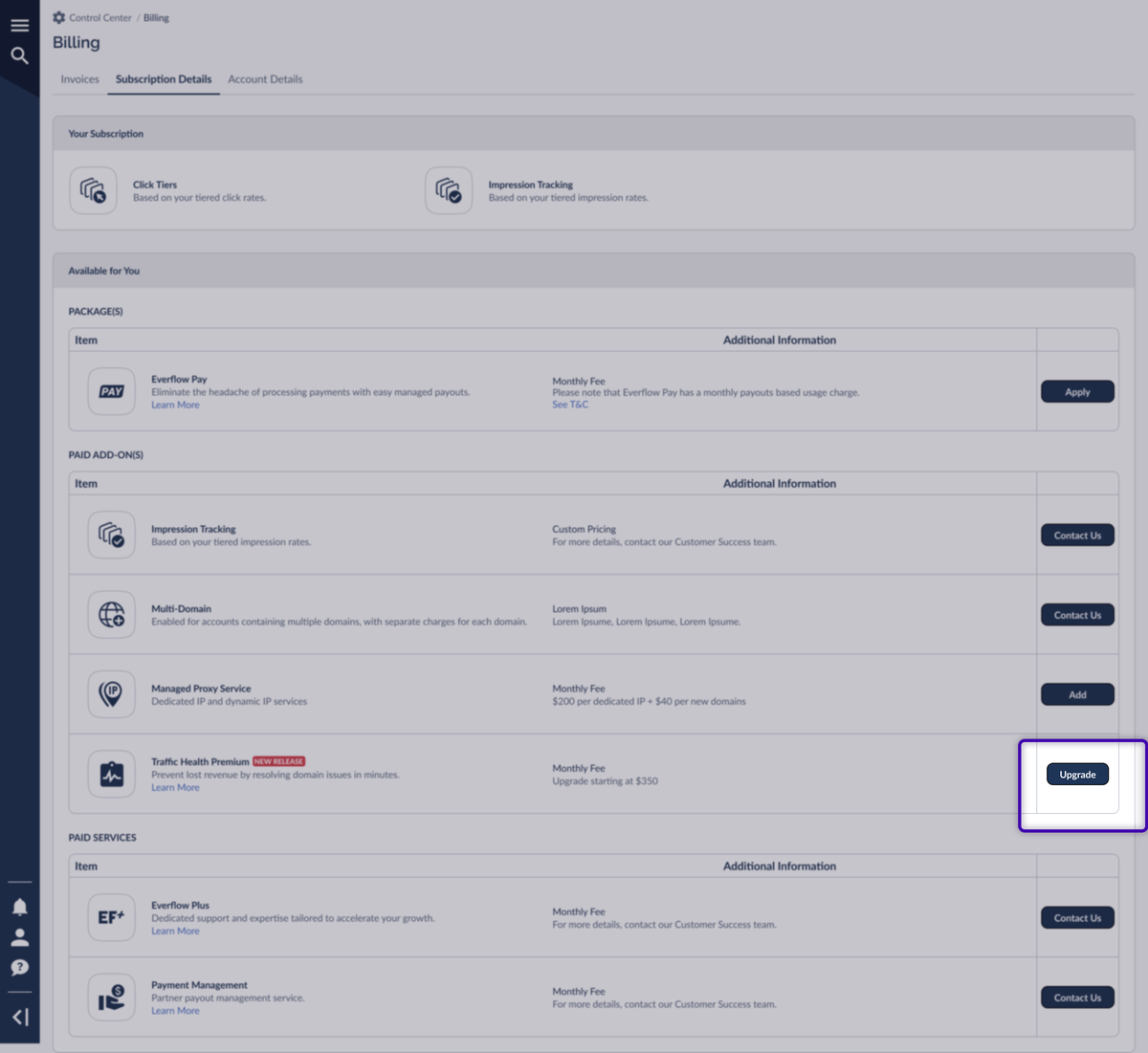
On the Subscription Details tab, Traffic Health Premium shows up in the Paid Add-On(s) table with an Upgrade button. That's your entry point to the upgrade flow.
Feature comparison
The clearest side-by-side of the two packages lives on the upgrade page itself. Here's every capability and which package it comes with. The first five rows are shared, and everything below them is what Premium unlocks.
You'll find this full matrix on the Upgrade Your Traffic Health Plan page, which you reach from the Upgrade button on the add-on row.
Why Premium Might Be Right for You
Open the upgrade page and Everflow points out a few reasons Premium fits your setup specifically. These prompts are personalized to how your domains, Partners, and Offers are configured, so your list won't match the example below. Weighing Basic against Premium? Our support team is happy to talk it through. Once Premium looks right, the next thing to pick is how many domains you want it to cover.
Premium Plan Tiers
Premium is priced by the number of domains your plan covers, counting both your Everflow tracking domains and any external domains you choose to monitor. There are three capacity options:
Up to 10 domains
Upgrade instantly from the billing console.
Up to 25 domains
Upgrade instantly from the billing console.
26+ domains
Send a price request and our team sets you up.
For current pricing on each capacity, see the Upgrade Your Traffic Health Plan page in your billing console, or reach out to your Customer Success contact. Pricing for the 26+ custom plan is set individually.
Choosing your capacity
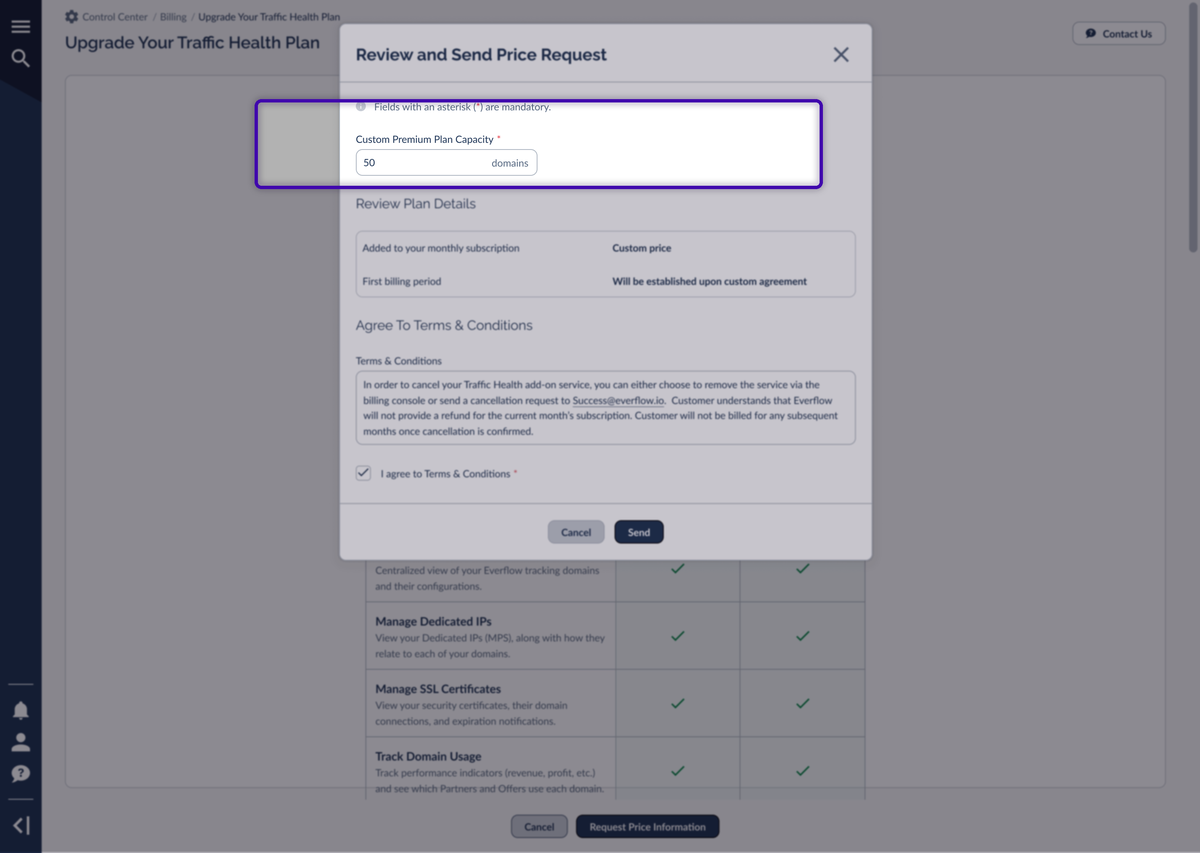
On the upgrade page, a toggle at the top lets you switch between Up to 10 domains, Up to 25 domains, and 26+ domains. The feature list stays the same across all three. The only things that change are how many domains you can cover and the price. Selecting 26+ domains switches the page into the custom-plan path, where the action becomes Request Price Information instead of an instant upgrade.
Upgrading to Premium
How you upgrade depends on the capacity you pick. The two smaller plans are fully self-serve and activate right away; the 26+ custom plan goes through a quick price request first.
Self-serve upgrade (up to 10 or up to 25 domains)
To upgrade to one of the self-serve tiers, go to
A success message confirms the change, and Traffic Health Premium now appears in Your Subscription with your chosen capacity.
If you're already on the Up to 10 domains plan, you can move up to Up to 25 domains the same way. The add-on row keeps an Upgrade button.
Requesting a custom plan (26+ domains)
If you need to cover more than 25 domains, the 26+ plan is a custom arrangement. Instead of confirming a charge, you tell us how many domains you need and our team follows up with pricing.
Managing Your Premium Coverage
Because Premium is priced by domain count, your plan has a set number of Premium coverage slots. You decide which domains fill those slots, and you can change that mix at any time without upgrading. This is how you keep your most important domains fully protected even when you're watching more domains than your plan covers.
The Premium Coverage meter
On the Traffic Health Configurations tab, the Premium Coverage card displays a meter showing how many slots you’re using out of your total plan allowance (for example, 8 / 10 Domains). A Manage Coverage link on the card lets you quickly reconfigure your domain settings whenever you need to rebalance.
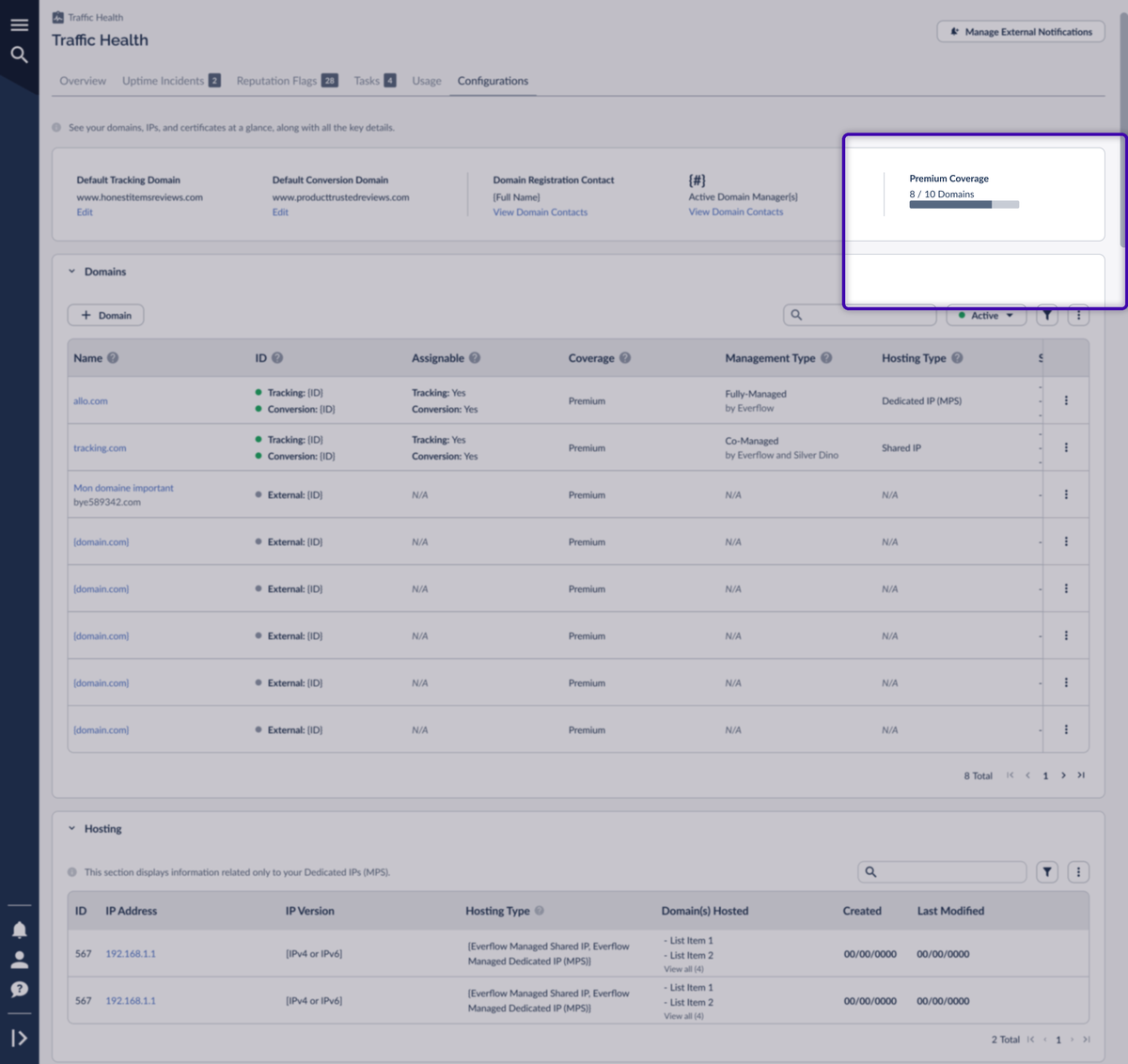
Each domain in your domains table shows its Coverage level, which can be one of three states:
When you go over your limit
You can add more domains to Traffic Health than your plan covers. When you do, the Premium Coverage meter flags that you're over your limit and any domains beyond your capacity drop to Reduced coverage, some of which may end up with no active monitoring. The card shows a warning and a prompt to manage your coverage.
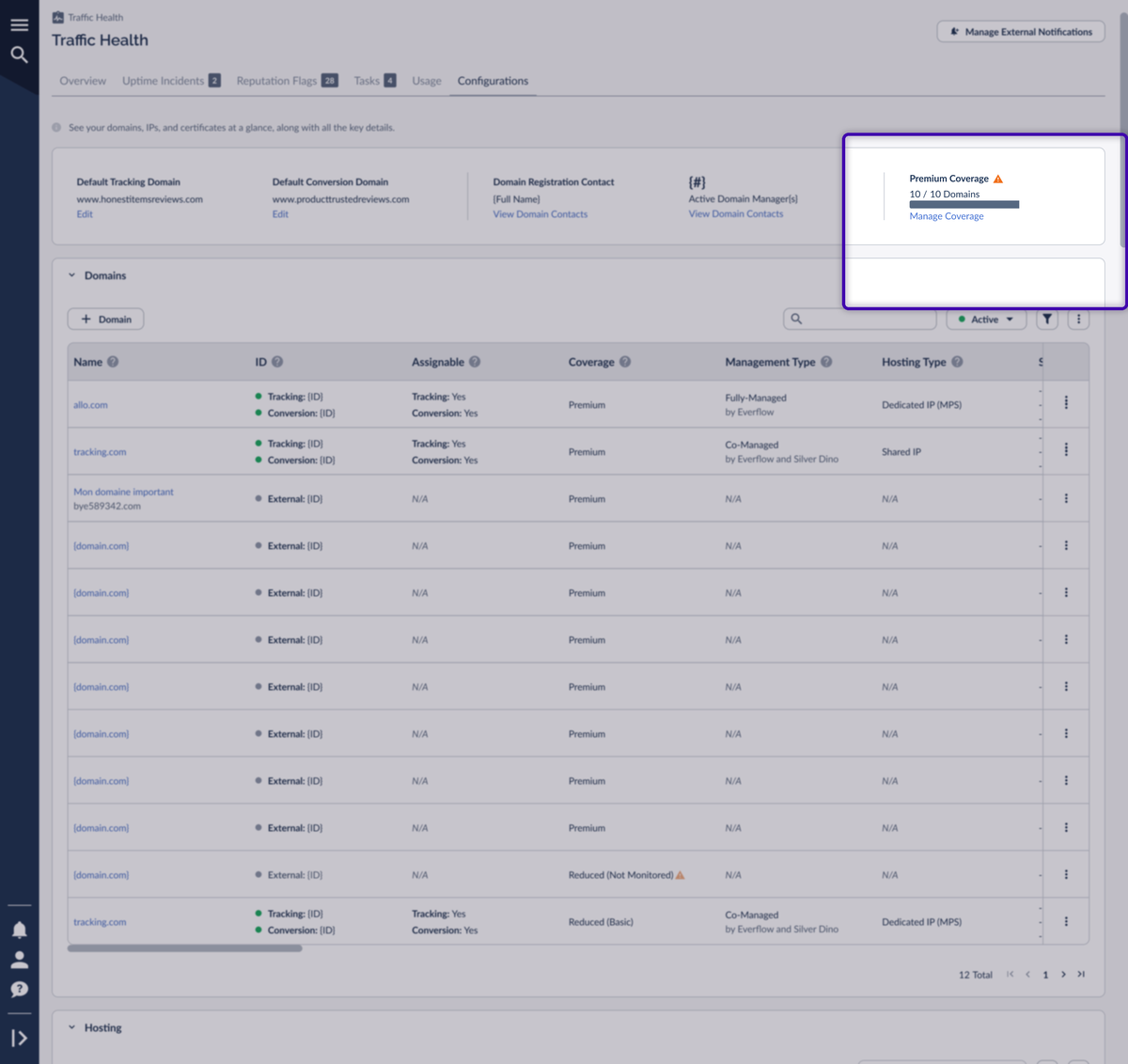
From here you have two choices: rebalance your existing slots so your most important domains stay on Premium, or upgrade to a larger plan so every domain gets full coverage. The next two sections cover the rebalancing tools.
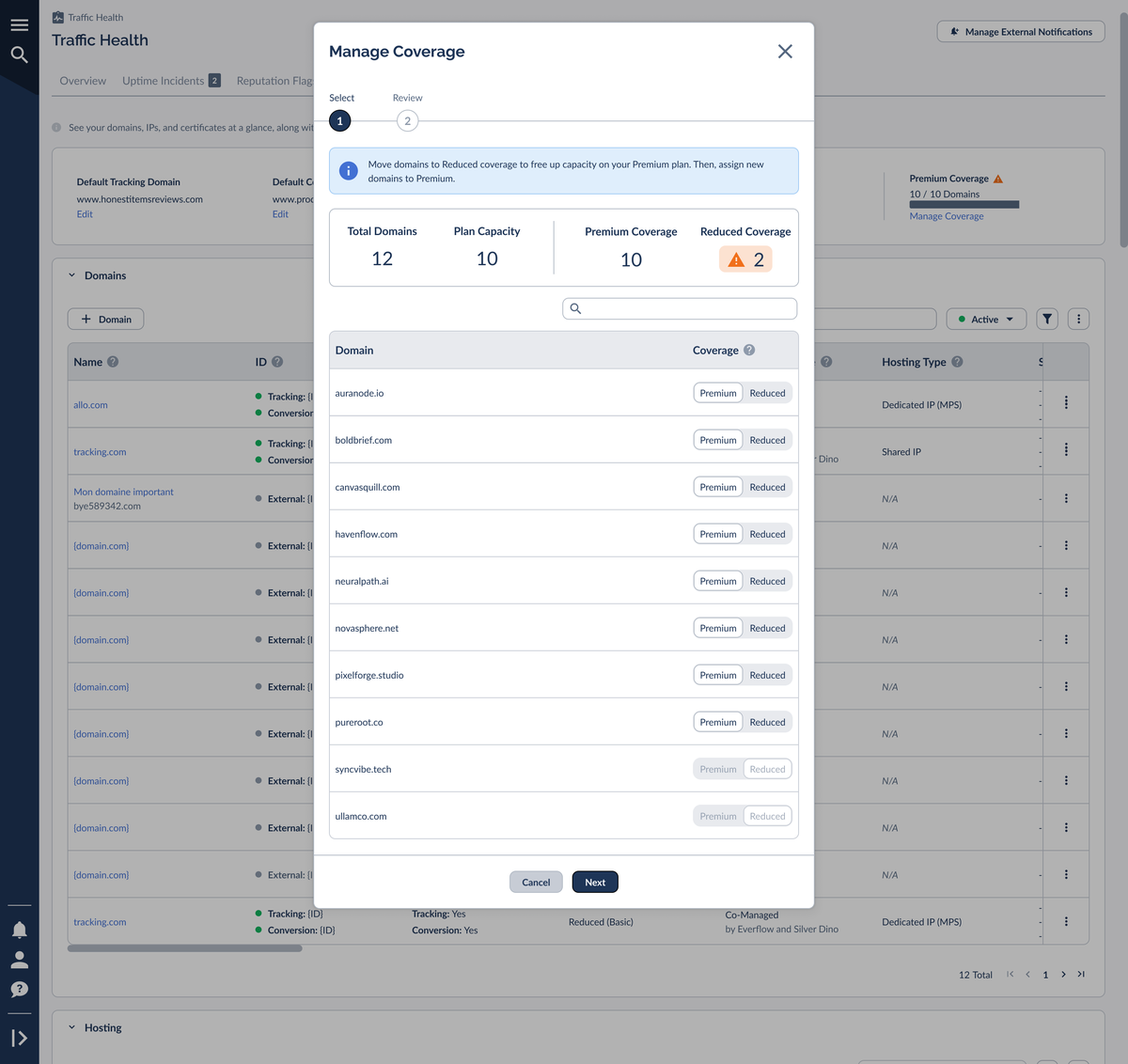
Manage Coverage (bulk)
The Manage Coverage link opens a two-step window for adjusting several domains at once. Use it when you want to free up capacity and reassign multiple domains in one pass.
Move to Premium (single domain)
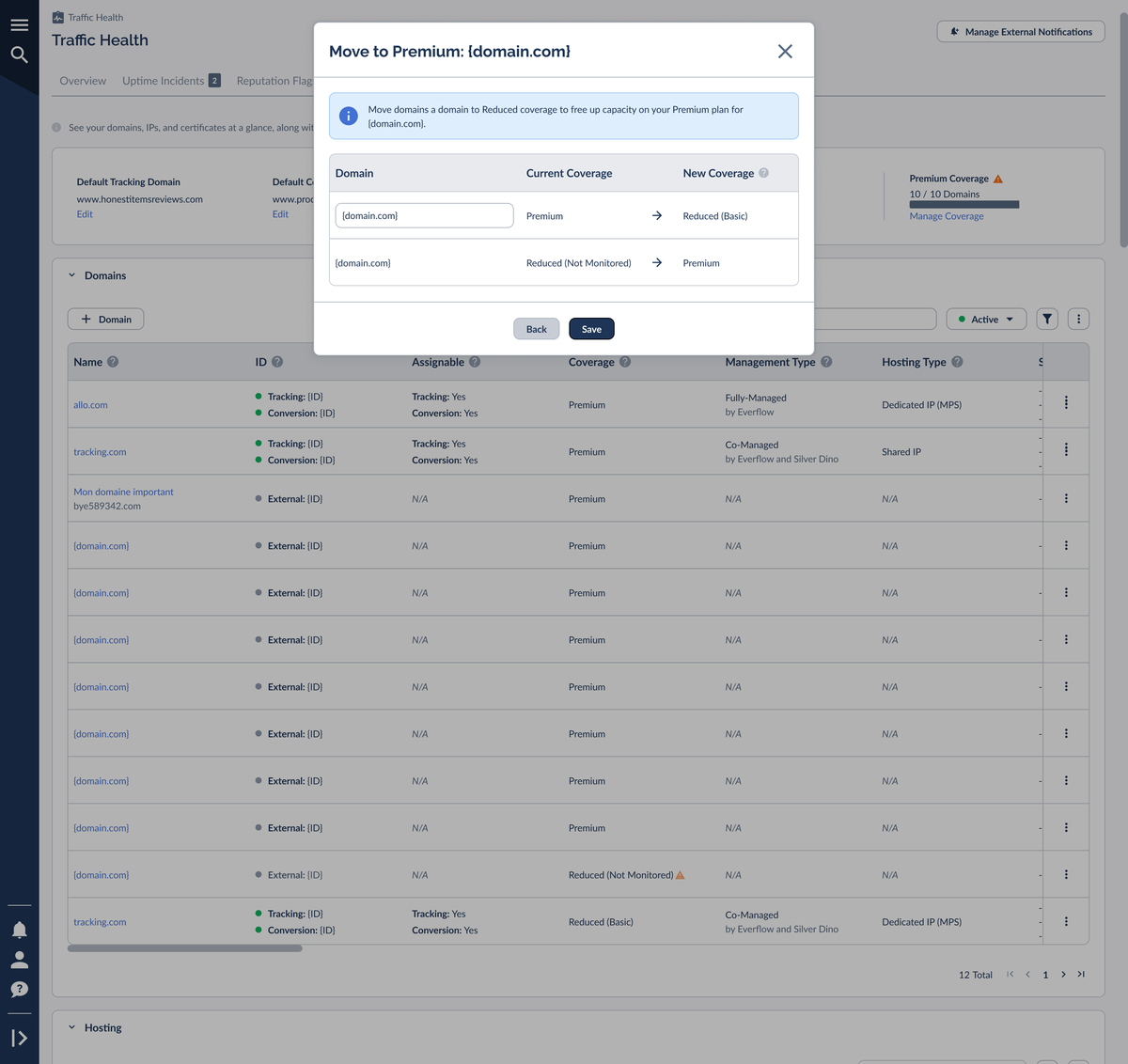
When you just want to give one specific domain full coverage and you're already at capacity, use Move to Premium. It's a focused swap: you pick a less-critical domain to drop to Reduced, which frees a slot for the domain you want to promote.
You can move up between the self-serve tiers at any time from the Subscription Details tab.
Reputation Monitoring & Dedicated IPs
Premium checks your domains and Dedicated IPs against three well-known reputation and threat sources, so you find out fast if anything you rely on lands on a blocklist:

Google Threat Intelligence
Flags domains and URLs tied to malware, phishing, and other malicious activity, drawing on Google's global threat data.
Visit Google Threat Intelligence ↗
HetrixTools
Monitors your domains and Dedicated IPs against dozens of major blacklists in real time.
Visit HetrixTools ↗EasyList
A widely used open filter list that identifies domains serving intrusive ads and trackers.
Visit EasyList ↗Reputation monitoring is one of the headline reasons to go Premium, but there's an important detail for IP reputation specifically. To track the reputation of an IP address (whether it's appearing on blacklists), two things both have to be true:
This is sometimes called a “double gate.” Domains that run on a shared IP don't get IP reputation data even on Premium, because a shared IP's reputation isn't tied to your traffic alone. Premium still monitors domain reputation in both cases. The double gate applies only to IP reputation.
Changing or Cancelling Your Plan
You can change your Traffic Health plan whenever your needs change, right from
Frequently Asked Questions
A few common questions about Traffic Health packages and billing:
No. Basic is free and active on every Everflow account, giving baseline uptime monitoring to the tracking domains fully or co-managed by Everflow.
By the number of domains your plan covers: up to 10, up to 25, or a custom 26+ plan. For current pricing, see the Upgrade Your Traffic Health Plan page in your billing console or contact your Customer Success team.
You can still add them, but only up to your plan's capacity get full Premium coverage. The rest drop to Reduced coverage. Use Manage Coverage or Move to Premium to choose which domains keep their Premium slots, or upgrade to a larger plan.
No. Monitoring external domains (and tracking domains you host independently) requires Premium. Those domains stay unmonitored on Basic.
IP reputation requires both Premium and a Dedicated IP through Everflow's Managed Proxy Service (MPS). Domains on a shared IP won't show IP reputation data. Domain reputation is still monitored in both cases.
Remove the Traffic Health add-on from the billing console, or send a cancellation request to your Customer Success team. You won't be billed for any month after the cancellation is confirmed; the current month isn't refunded.


