


.svg)

Overview
Everflow Pay pays your Partners out of a balance you top up yourself. Before your first payout run, that balance needs money in it. This guide covers Manual Funding, where you send the money to us from your own bank by wire or ACH, and it tells you exactly where to find the details you need and the one field you must not leave empty.
Everflow Pay is open to businesses in the United States and internationally, and your funding options depend on where your bank is. That branch is the first thing to get straight, so we start there.
Which Funding Routes You Have
Everflow Pay holds your money in a funding wallet, and that wallet is always in US dollars. There are two ways to get money into it. Not every account gets both.
| Where your bank is | Manual Funding | Bank Debit |
|---|---|---|
| United States | Available | Available |
| Canada | Available | Available, converted to USD |
| Anywhere else | Available | Not available |
Manual Funding, where you send the money
You initiate a transfer from your own bank to the account details Everflow Pay shows you, and you tag it with a Reference Code so we can match the money to your account. This is the route covered in the rest of this guide, and it is available to every Everflow Pay customer wherever your business banks.
Bank Debit, where we pull the money
You link a bank account once, then request a deposit from inside Everflow Pay and we pull the funds. There is no transfer to initiate at your bank and no Reference Code to remember. Bank Debit is limited to bank accounts in the United States and Canada, and the modal that opens is labelled
US bank accounts
You enter your bank name, routing number and bank account number, then choose either a custom amount or the total currently awaiting funds.
Canadian bank accounts
Canada has its own set of fields: bank name, bank account number, transit code and institution number. The deposit itself is still in US dollars, and the screen says so plainly: pulls from Canadian banks will be converted into USD. Enter the amount you want to land in your wallet in USD.
Open Your Funding Instructions
Everything you need for a manual transfer lives in one place. Log in to your Everflow Pay platform, not the Everflow Core Platform, and look at the funding card at the top of the Dashboard.
Open the funding instructions
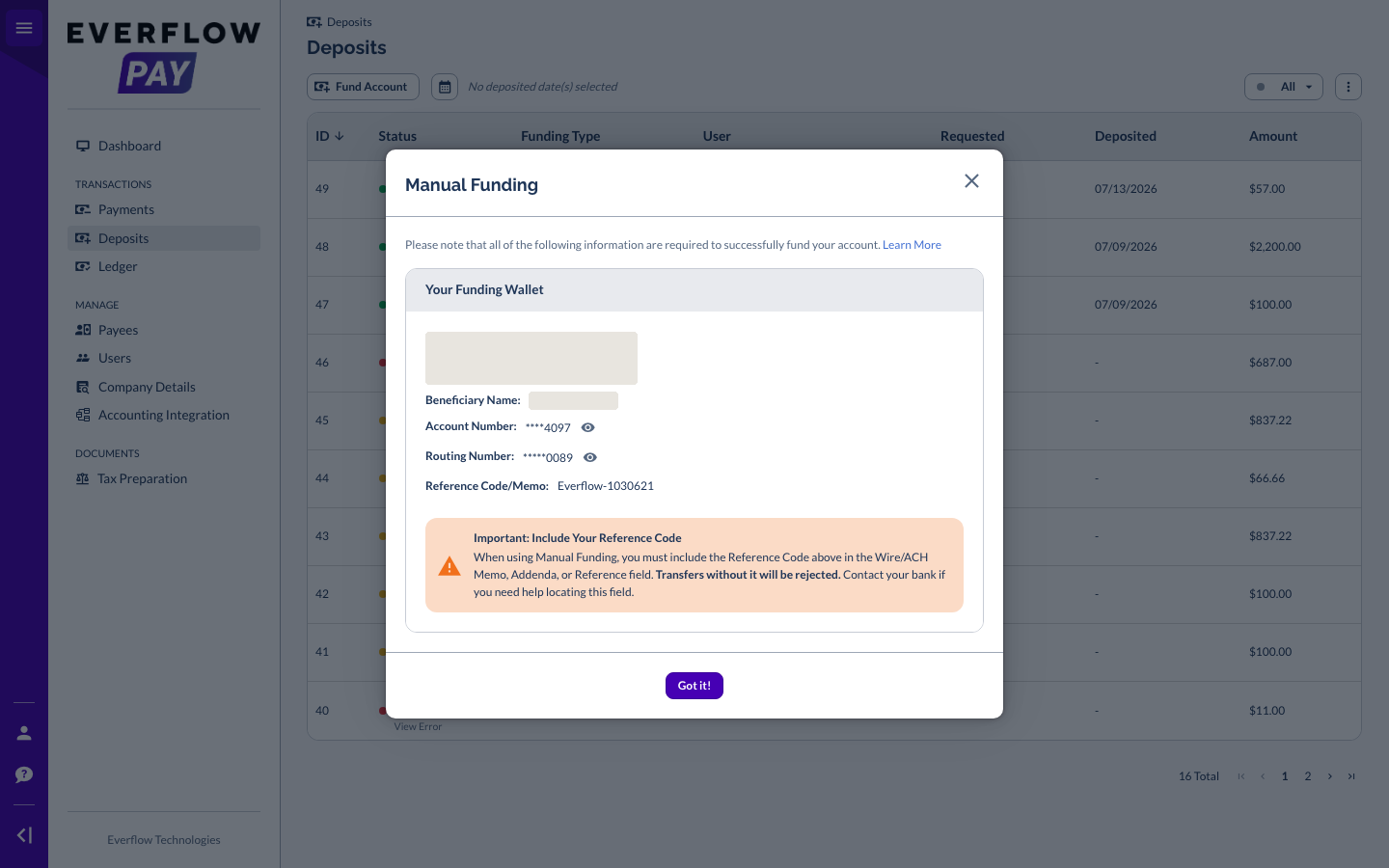
Log in to Everflow Pay, find the funding card on the Dashboard and open the funding instructions from it. The modal that opens carries your own account details.
What the instructions show
The same details, wherever you are. Your Everflow Pay wallet is held in US dollars only, so every customer gets the same set of rows: the beneficiary, the account number, a routing number and your Reference Code. There is no separate international version of this screen.
You can send from a bank in any country. The money is converted to US dollars on the way in, and the conversion cost is built into the exchange rate rather than charged as a fee. If your bank lets you send US dollars directly, do that, because then nothing is converted.
Your Reference Code
The Reference Code is the single thing that connects your transfer to your Everflow Pay account. It is the word Everflow followed by a hyphen and a number, it is unique to you, and it appears in the funding instructions modal on the row labelled Reference Code/Memo. If it does not travel with the money, the money cannot be matched.
Where the code goes in your bank's form
Banks label this field differently. On a wire it is usually Reference, Message to Beneficiary or Payment Details. On an ACH transfer it is usually Memo, Description or Addenda. Paste the code on its own, with no extra words around it. If you cannot find the field, your bank can point you to it.
If you already sent a transfer without it
Do not send a second transfer. Email pay.help@everflow.io straight away with a copy of your transfer receipt, including the federal reference number if you sent a wire, and we will trace it.
Send the Transfer
With the details copied, initiate the transfer from your bank. A wire usually arrives same day or the next business day. An ACH transfer usually takes one to three business days to clear. Transfers started on a Friday or over a weekend land later than you expect, so give yourself room before a payout run.
Funding from outside the United States
Your wallet is denominated in US dollars, so every deposit ends up as USD no matter what you send.
Send in USD if your bank lets you
The funding instructions screen recommends funding in USD to avoid external FX conversion fees. That is the cheapest path, because the money arrives already in the wallet currency and nobody has to convert it.
What happens if you send another currency
If you send a currency other than USD, our payment provider converts it to USD on arrival and your wallet is credited with the converted amount. The conversion cost is built into the exchange rate rather than charged as a separate line item, which is why the amount that lands can be a little under the amount you sent.
After You Send
You do not need to tell anyone the transfer is on its way. Everflow Pay picks it up from the Reference Code and moves it through on its own.
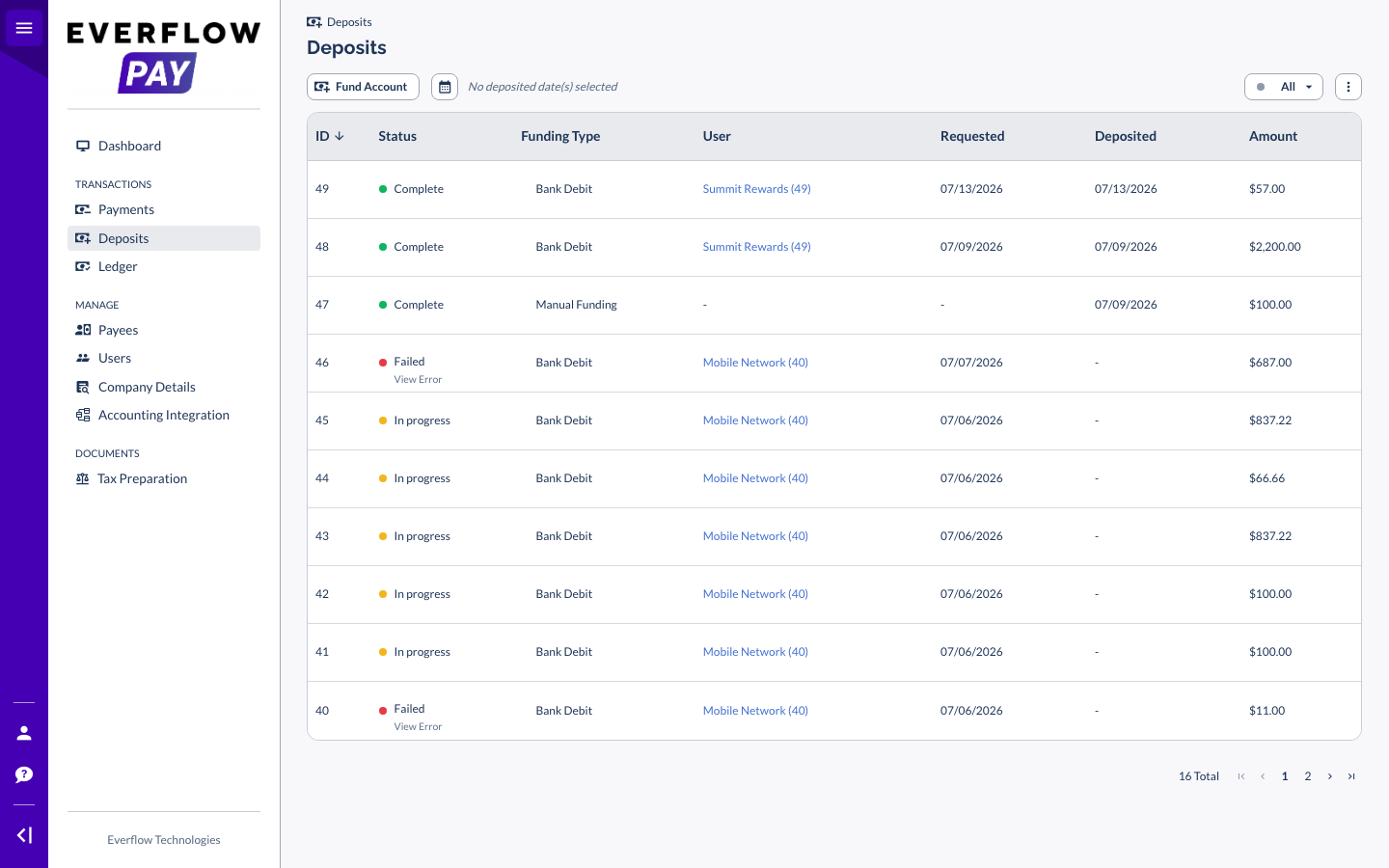
Deposit statuses
Open
| Status | What it means |
|---|---|
| In Progress | The transfer has been picked up and is on its way. Nothing for you to do. |
| Complete | The transfer was successfully deposited. Your available balance on the funding card has gone up. |
| Incomplete | The transfer was cancelled or not completed. The most common cause is a missing Reference Code. |
If a deposit sits in In Progress longer than the timings above, check the Reference Code on your bank receipt first. That is the cause in most cases.
What funding costs
Everflow does not charge you to receive funds, and there is no fee from our payment provider for a domestic bank transfer or an incoming SWIFT wire. Your own bank may charge you to send one, so check with them before a large transfer.
Everflow does not set a maximum on how much you can fund. Your bank probably does, especially on same-day wires, so confirm your daily limit if you are planning a large top-up.
Frequently Asked Questions
The deposit is rejected by our banking service provider and you will need to re-initiate the transfer. Email pay.help@everflow.io with a copy of your transfer receipt before you send anything a second time.
Only if the account you want to pull from is held at a bank in the United States or Canada. Bank Debit runs on the US and Canadian domestic debit networks, so an account anywhere else cannot be linked. Manual Funding is the route to use.
No. The funding wallet is always in US dollars. You can send other currencies and they will be converted on arrival, but the balance you pay Partners from is USD.
The two usual causes are a transfer sent over a weekend and a missing Reference Code. Check Deposits for the current status, then check your bank receipt for the Reference Code. If both look right and it has been longer than three business days, contact pay.help@everflow.io.
Manual Funding has no minimum set by Everflow. Bank Debit has a minimum of $10 per deposit. Separately, an international payment to a Partner has a $50 minimum, so fund enough to cover the payments you intend to release.
If your question is not here, email pay.help@everflow.io and the Everflow Pay team will pick it up.
→ Funding Your Everflow Pay Account via Bank Debit, the pull route for bank accounts in the United States and Canada.
→ Understanding Your Everflow Pay Dashboard, what every card and menu on the Dashboard does.
→ Everflow Pay Countries Served List, where you can pay Partners and in which currencies.
→ Understanding Everflow Pay Fees and Who Pays Them, what a payout costs and who is charged.


