


.svg)

Overview
Before you can pay a Partner through Everflow Pay, that Partner has to be payable. This article explains what that means, what the account statuses are, and how to read the reason a Partner is not payable yet, so you can tell them exactly what to fix instead of guessing.
Your Partners have a much shorter path than you did. Once a Partner saves their banking details they usually become payable within minutes. There is no test deposit and no bank account verification step: both were removed for everyone, not just for international accounts.
Where a Partner does get held up, it is almost always one of a small number of reasons, and the platform names the reason for you.
Account Types
Everflow Pay sorts every Partner you pay into one of two account types. The type is set by where the Partner banks, and it decides which payment rules apply to them and which banking fields they are asked for.
Domestic Accounts (US)
These are Partners banking in the United States. They follow US payment rules, and their payouts run as a one day ACH transfer. You will find them under Payees in Everflow Pay.
International Accounts
These are Partners banking outside the United States, including Canada. They follow international payment rules, and their payouts run as an international transaction. You will find them under Payees in the same list.
Canada is worth calling out because it sits in the middle. A Canadian Partner is an international account, and their banking form asks for a SWIFT/BIC, a Transit Code and a Bank Institution Number, with the bank itself picked from a dropdown rather than typed in.
Where To Check A Partner's Status
The same status is visible from two places, and it is the same value in both. Which one you open depends on where you already are.
Status changes sync between the two in real time, so you do not need to refresh one after acting in the other.
Payable And Not Payable
There are only two values, and they are the ones the product shows you: PAYABLE and NOT PAYABLE. A Partner who is PAYABLE can be included in a payment run. A Partner who is NOT PAYABLE cannot, and the Unpayable Reason tells you why.
It is worth being precise here, because Everflow Pay uses different words for different objects and they are not interchangeable. Payments have their own set of statuses, and so do deposits into your wallet. Payable and not payable describe the Partner's account, nothing else.
Why A Partner Is Not Payable Yet
Below are the reasons you will see on a Partner's record, and what each one actually asks the Partner to do. Most of them clear the moment the Partner finishes the step.
Who Completes A US Tax Form
Whether a Partner completes a US tax form depends on the payer, not on where the Partner is. If the business paying them is registered in the US, they complete one: a W-9 if they are US-based, a W-8 if they are not. If the business paying them is registered outside the US, there is no US tax form step at all, and Everflow Pay does not collect US tax documents on your behalf.
A Tax ID is a number, not a form. Where the setup form asks for one, its help text reads: for US-based users this is your SSN or EIN, and for international users it is your local equivalent tax or business registration number, such as a Business Number or SIN in Canada. It is worth encouraging Partners to fill it in accurately, because some countries will reject an incoming payment outright if the local tax ID is missing or the wrong length.
Two Causes That Catch People Out
Not every NOT PAYABLE has a tax or banking reason behind it. Two others come up often enough to be worth knowing.
The Partner Is Still Set To Wire
Wire can no longer be selected as a Partner's payment type, so a Partner whose billing still has Wire on it will not become payable no matter how complete the rest of their setup is. The fix is on the Partner's side: they update their billing to Everflow Pay. This one is easy to miss because nothing about the tax or banking sections looks wrong. Note that this is about the payment type a Partner can pick, not about how the money physically travels. International payouts still move over wire or local networks.
A Probation Window On A New Payee Record
A short probation window can run on a payee record straight after it is created, holding the Partner at NOT PAYABLE until it closes. It is a setting on the payer's account rather than something the Partner triggered, and it clears by itself. It surprises people most when a Partner who was already paying fine suddenly shows as not payable, which happens because a new connection creates a new payee record and starts a new window on it.
What Your Partner Sees While They Finish Setup
How many steps they see depends on their setup. A Partner with no tax form step sees two: their general and banking information, then Ready To Receive Payments. A Partner who does have one sees three, with U.S. Tax Information in the middle and a Select Tax Form button on it.
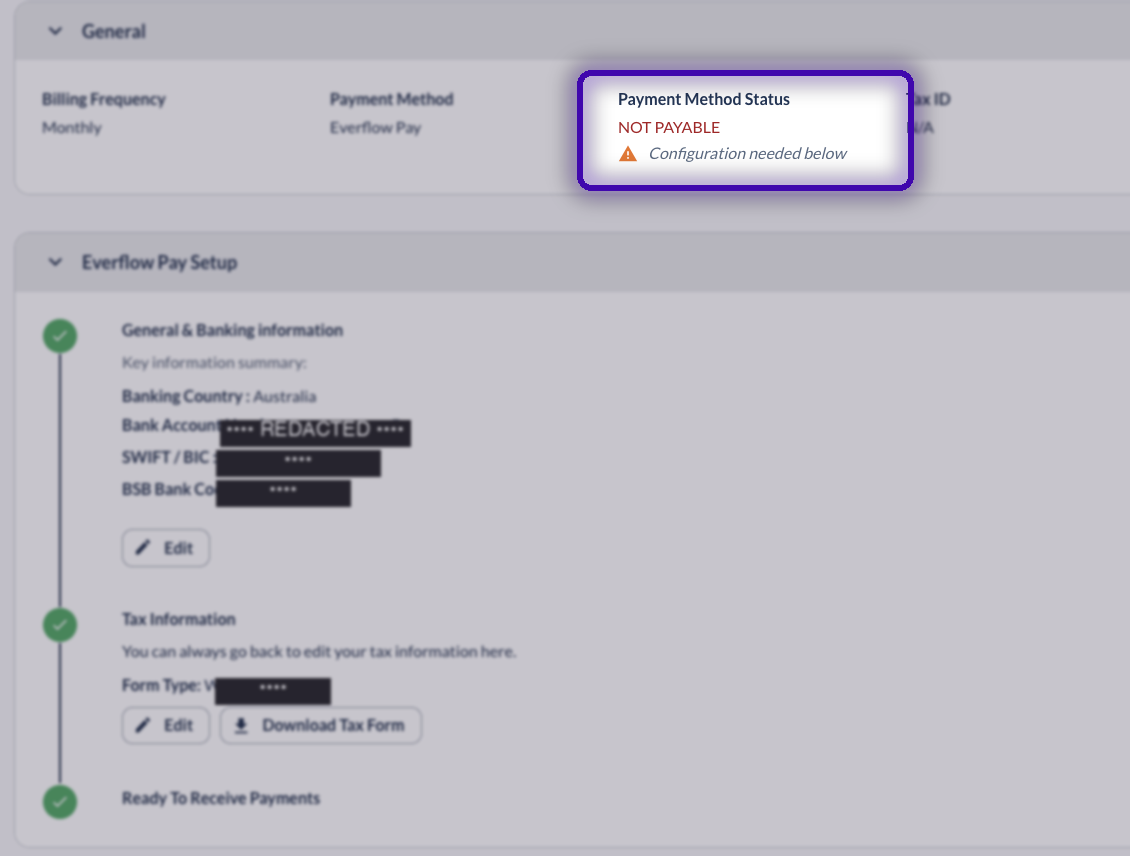
Once the last step turns green their status flips to PAYABLE, on their screen and on yours, and you can include them in your next payment run.
→ Get Partners Started With Everflow Pay gives you the invite and follow-up steps.
→ Everflow Pay Tax Features & Reporting covers TIN verification, W-9 generation and your year-end exports.
→ Everflow Pay Notification Center is where you switch on the alerts that tell you a Partner changed their banking or tax details.
→ Understanding Everflow Pay Payment Statuses explains the payment statuses, which are a separate set of words from the ones above.
If a Partner is stuck on a reason that is not in the table above, or the reason clears and the status does not follow, email pay.help@everflow.io with the Partner's ID and we will look at the record directly.


